
Creating your ScaleDux account takes less than 3 minutes. Whether you’re joining as a Founder, Expert, Mentor, or Investor, the signup process is exactly the same for everyone.
In this guide, we’ll walk you through the account creation process and help you choose the right role to get started.
ScaleDux is designed for individuals who are 18 years of age or older.
Because the platform includes professional networking, business transactions, service engagements, mentorship, and investment-related activities, users must be legally eligible to use the platform independently.
If you’re currently under 18 and interested in startups, freelancing, mentorship, or investing, we encourage you to continue learning and exploring. We’d be happy to welcome you to ScaleDux once you meet the minimum age requirement.
Before You Start #
Make sure you have:
- A valid email address or mobile number
- Access to receive verification codes (if required)
- A secure password in mind (for manual signup)
- A clear idea of how you’d like to use ScaleDux
Choose how you want to sign up #
When you open the signup page, you’ll see three ways to create your account.
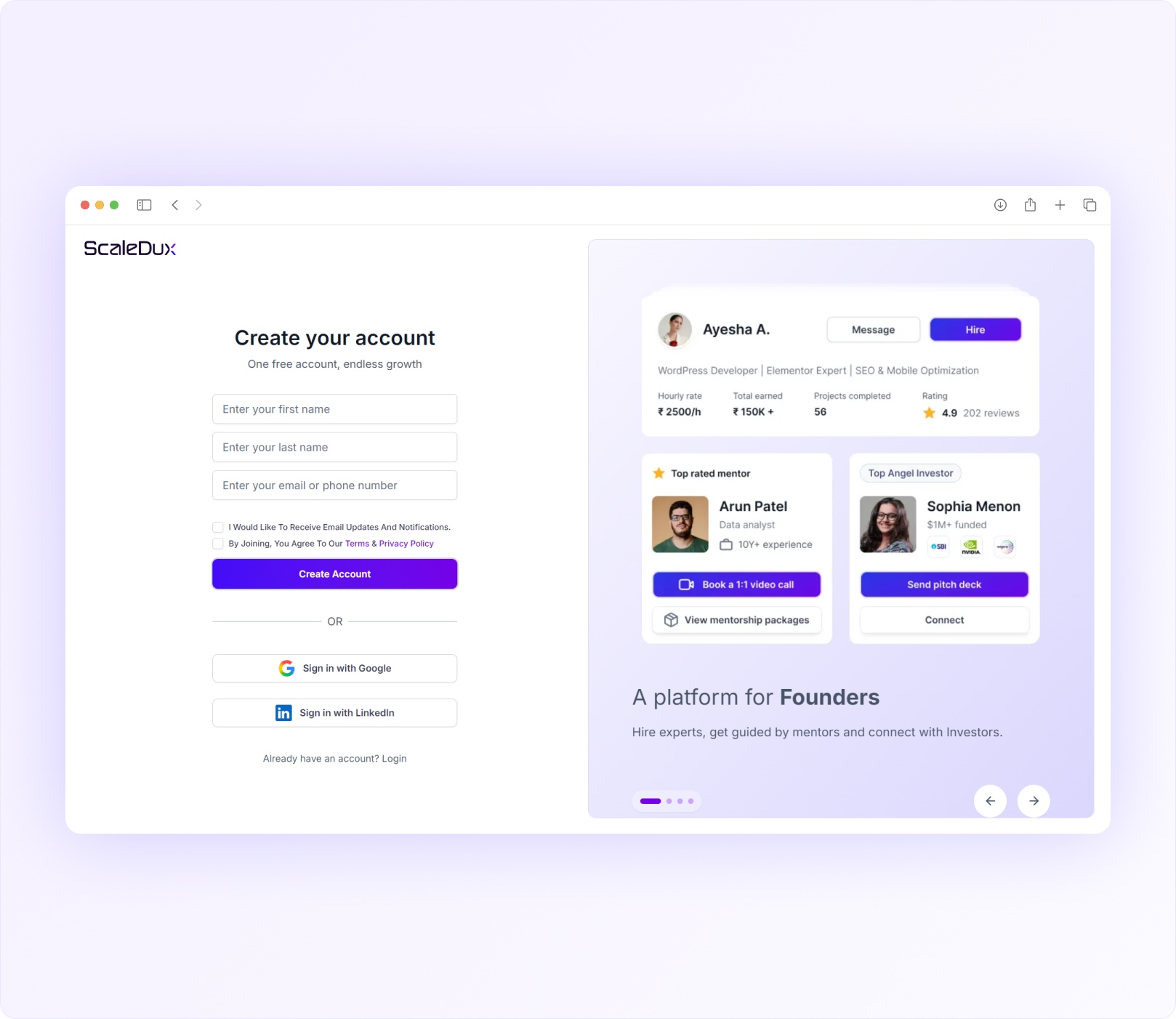
Continue with Google

#
- Use your Google account to create a ScaleDux account in a few clicks.
- Once authentication is completed, you’ll be taken directly to the role selection step.
- No separate password setup is required.
Continue with LinkedIn
#
- Use your LinkedIn account to sign up quickly.
- After successful authentication, you’ll be taken directly to the role selection step.
- No separate password setup is required.
Sign Up with Email Address or Mobile Number #
Prefer creating an account manually?
Simply enter:
- First Name
- Last Name
- Email Address or Mobile Number
Then follow the verification and password setup process.
🔒 Use Your Real Name
- Please enter your real first and last name as they appear on your official documents.
- This is important for building trust on the platform and helps ensure your profile, invoices, payments, tax records, and verification information remain accurate. Using an incorrect name may cause delays during verification or future transactions.
Review and Accept the Terms #
Before creating your account, you’ll be asked to accept our:
These explain how ScaleDux works, how your information is handled, and the responsibilities of all users on the platform.
Important #
You won’t be able to continue until you accept the Terms of Service and Privacy Policy.
Verify Your Email Address or Mobile Number #
If you’re signing up manually, we’ll verify your contact information before creating your account.
Using an Email Address? #
We’ll send a 6-digit verification code to your inbox.
Using a Mobile Number? #
We’ll send a 6-digit OTP via SMS. Simply enter the code and continue.
Didn’t receive the code? #
Before requesting a new code:
- Check your Spam or Junk folder
- Wait a few minutes and then retry
- Confirm your email address or mobile number is correct
Need to make a correction? Go back, update your details, and continue again.
Create a Secure Password #
Once your email address or mobile number has been verified, you’ll be asked to create a password for your account.
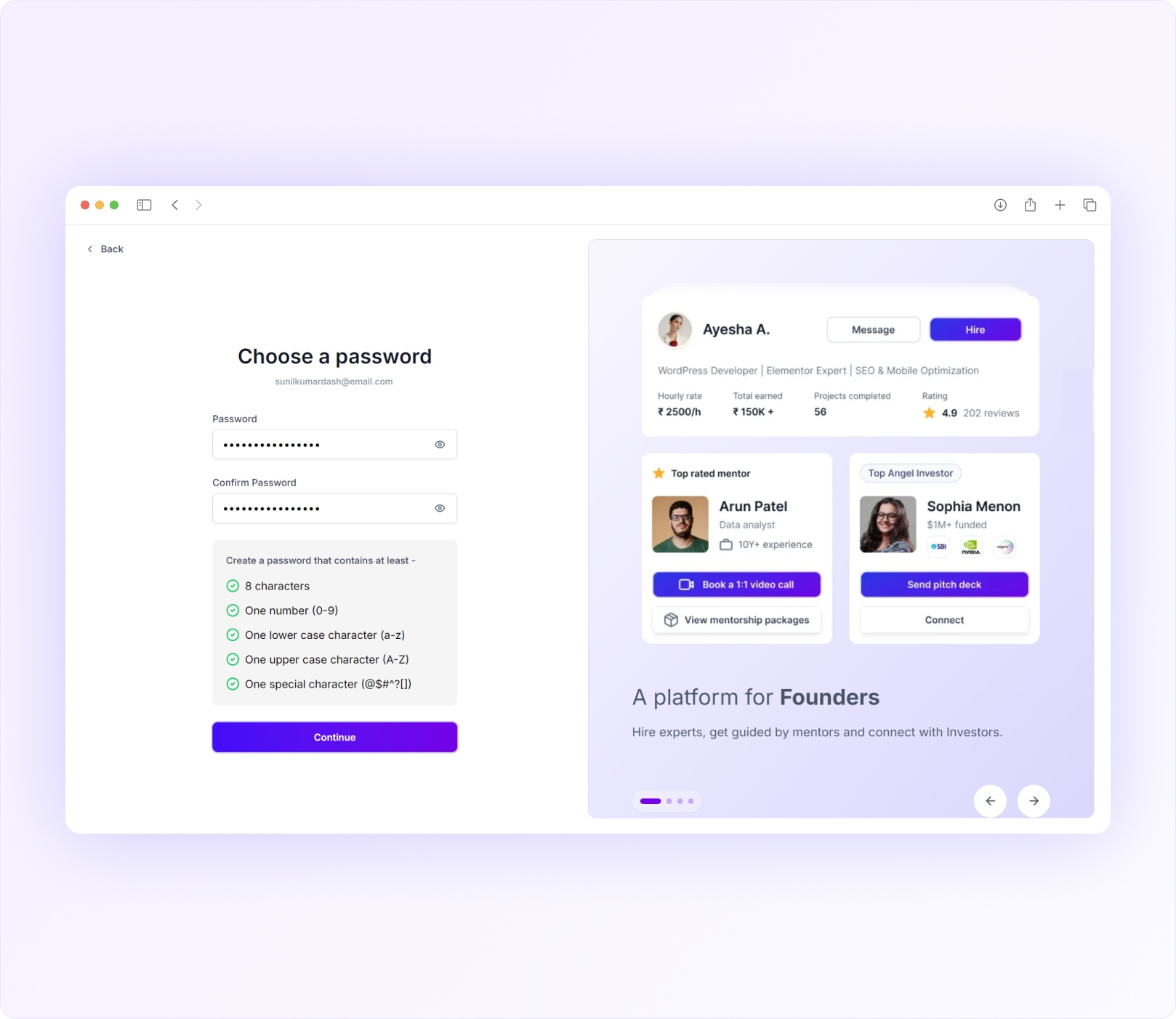
To keep your account secure, your password must contain:
- At least 8 characters
- One uppercase letter (A–Z)
- One lowercase letter (a–z)
- One number (0–9)
- One special character
As you type, you’ll see which requirements have been completed. Once all requirements are met and both password fields match, click Continue.
Common Password Issues #
My password isn’t accepted
Make sure all password requirements are completed before continuing.
Passwords do not match
Your Password and Confirm Password fields must contain exactly the same password.
I forgot my password later
You can reset your password anytime from the login page.
You’re All Set #
Once your password is successfully created, you’ll see a confirmation message.
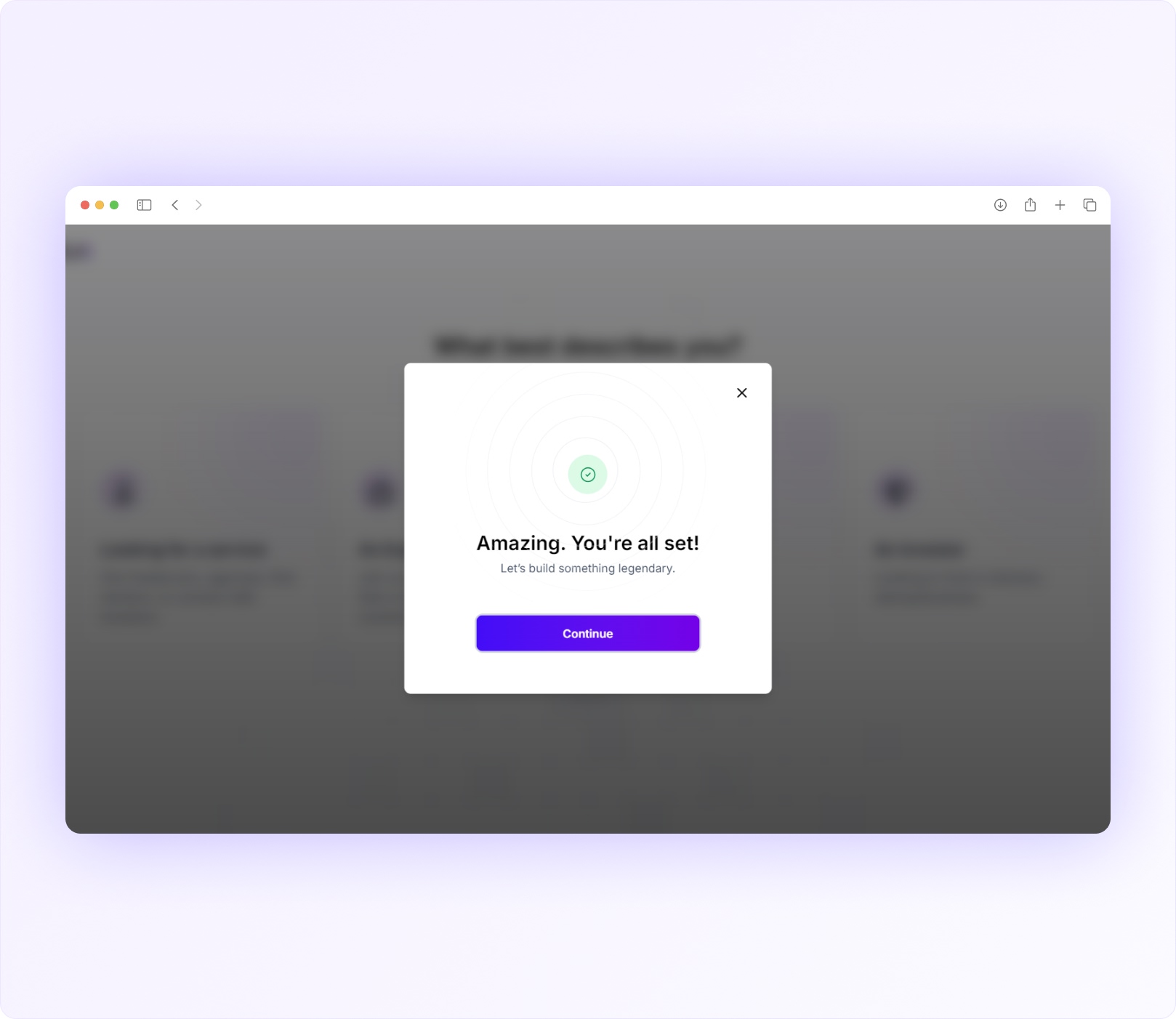
You’re now ready to choose how you’d like to use ScaleDux.
Choose Your Role #
After account creation, you’ll be asked:
“What best describes you?”
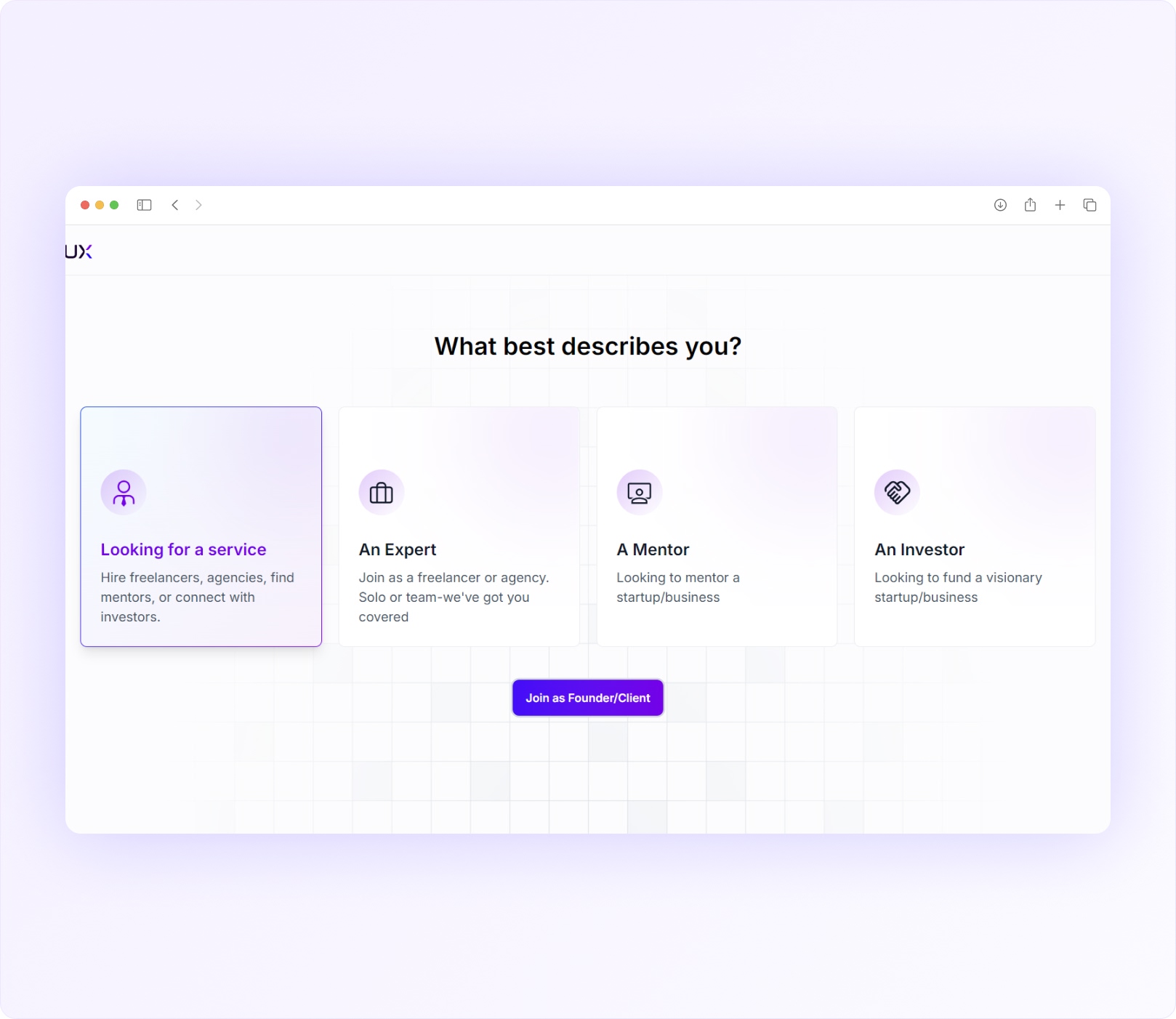
Choose the option that best matches your primary goal on ScaleDux.
Looking for a Service #
Choose this option if you want to:
- Hire freelancers or agencies
- Work with experts (service providers)
- Book mentorship sessions
- Connect with investors
- Build or grow your startup or business
This option is designed for:
- Founders
- Startup Teams
- Business Owners
- Clients
An Expert #
Choose this option if you want to:
- Offer freelance services/professional services
- Run an agency
- Apply for projects
- Create your service package
- Build your reputation
- Grow your client base
- Work with startup founders
This option is designed for:
- Freelancers
- Agencies
- Consultants
- Service Providers
A Mentor #
Choose this option if you want to:
- Guide founders and businesses
- Offer mentorship sessions
- Create mentorship packages
- Share your expertise and experience
This option is designed for:
- Mentors
- Coaches
- Advisors
- Industry Experts
An Investor #
Choose this option if you want to:
- Discover startups
- Connect with founders
- Review startup opportunities
- Explore potential investments
This option is designed for:
- Angel Investors
- Venture Capital Professionals
- Family Offices
- Investment Managers
💡 Not sure which role to choose?
Select the role that matches your primary goal today.
Your experience inside ScaleDux is personalized based on the role you choose.
Complete Registration #
After selecting your role, click the corresponding button to continue.
You’ll see a success message confirming your role has been updated successfully.
From there, you’ll be taken to your dashboard where you can start setting up your profile and exploring the platform.
Welcome to ScaleDux 🚀
Can I change my name later?
Yes. You can update your name from your account settings if required.
Can I change my email address and/or phone number later?
Yes. You can update your email address and phone number from your account settings.
Can I use the same email address for multiple roles?
No, you must use new/unique email address for multiple roles.